
In short
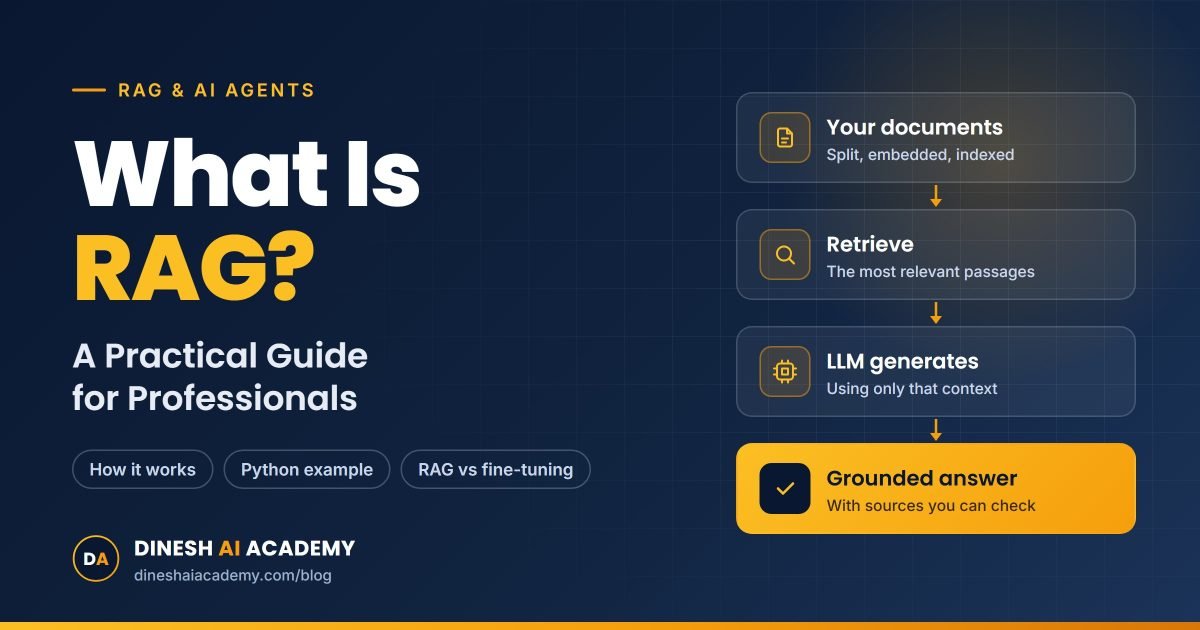
- RAG lets an AI model answer from your own documents: it retrieves the relevant passages first, then answers from them.
- It works without retraining the model. Update the documents and the answers update too, with citations back to the source.
- Answer quality depends mostly on retrieval: good chunking, hybrid search and testing against real questions.
Ask ChatGPT about your company’s leave policy and it will give you a confident, generic answer. It has never read your policy. Retrieval-augmented generation (RAG) fixes that: before the model answers, your system finds the right passages in your own documents and hands them to the model as evidence.
RAG is the most common pattern behind real business AI today, from internal help desks to “chat with your documents” tools. This guide explains how it works in plain language, shows a minimal working example, and covers the mistakes that make RAG systems give wrong answers.
What is RAG, in one sentence?
RAG is a technique where an AI application retrieves relevant information from your own data and adds it to the prompt, so the language model generates an answer grounded in that information instead of only in what it learned during training.
Think of it as an open-book exam. The model is still the student writing the answer, but now it gets to look at the right pages of the textbook first.
Why large language models need RAG
A large language model (LLM) such as GPT, Claude or Gemini is trained on a huge snapshot of public text. That gives it strong language and reasoning skills, but three gaps remain:
- It doesn’t know your private data. Contracts, policies, product manuals, tickets and emails were never in its training set.
- Its knowledge has a cutoff date. Anything that changed after training — a new price list, last week’s policy update — is invisible to it.
- It can hallucinate. When a model doesn’t know something, it may still produce a fluent, wrong answer. Giving it the source text, and telling it to answer only from that text, sharply reduces this.
RAG addresses all three without retraining the model. You update the documents, and the answers update with them.
How RAG works, step by step
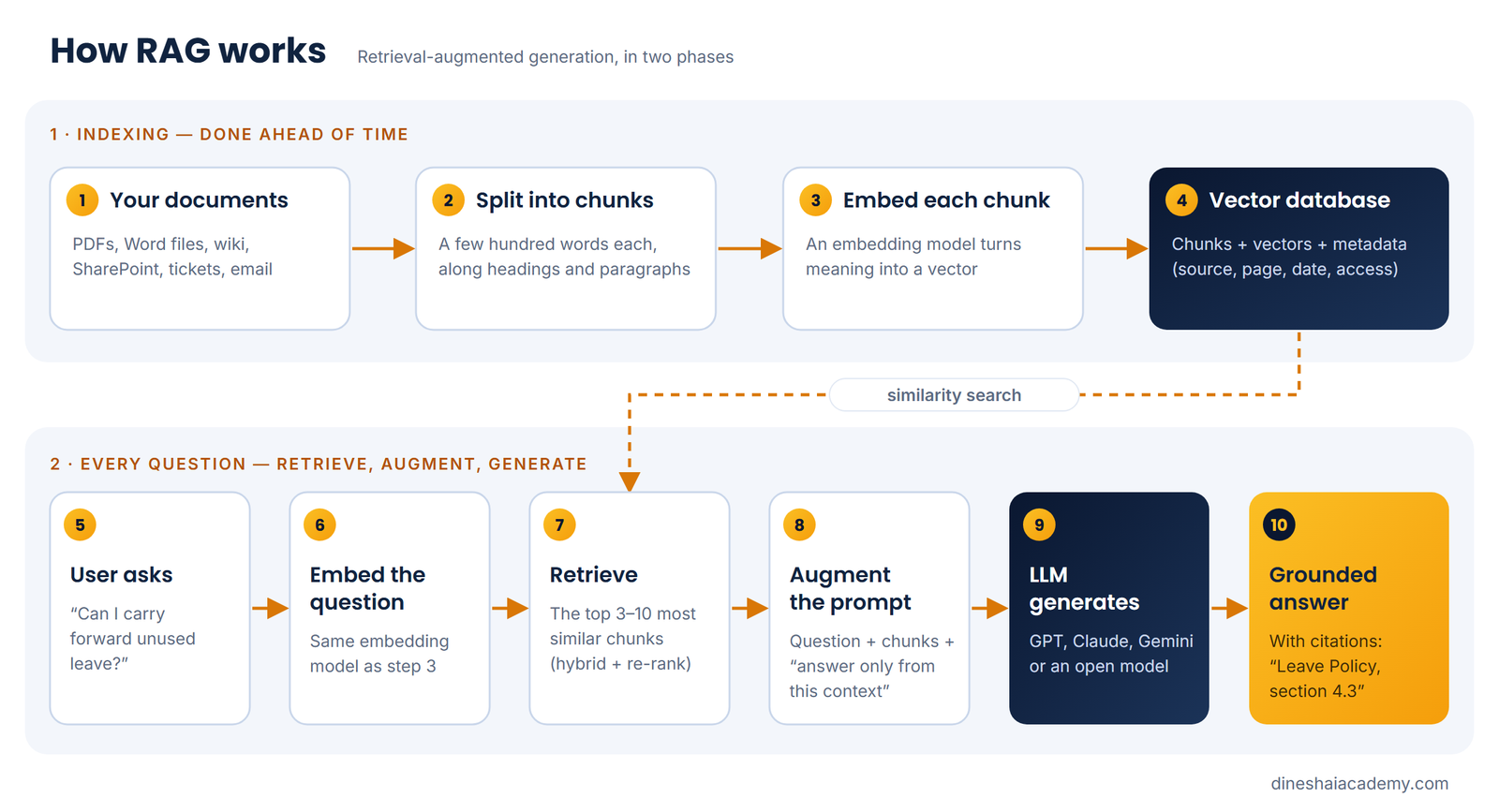
A RAG system has two phases: indexing, which you do ahead of time, and retrieval and generation, which happens every time someone asks a question.
Phase 1: Indexing your documents
- Load the documents — PDFs, Word files, web pages, SharePoint, a database export.
- Split them into chunks of a few hundred words each, ideally along natural boundaries such as headings and paragraphs. A whole 80-page manual is too big to send to a model; a focused chunk is not.
- Embed each chunk. An embedding model turns text into a list of numbers (a vector) that captures its meaning, so “annual leave carry-forward” and “unused holidays next year” end up close together.
- Store the vectors, with the original text and metadata (source file, page, date, department), in a vector database such as Chroma, pgvector, Pinecone, Qdrant or Azure AI Search.
Phase 2: Answering a question
- Embed the question with the same embedding model.
- Retrieve the chunks whose vectors are closest to the question — typically the top 3 to 10.
- Augment the prompt: put those chunks into the prompt as context, with an instruction like “answer only from the context; if the answer isn’t there, say so”.
- Generate the answer with the LLM, ideally citing which document and page each fact came from.
A worked example: an HR policy assistant
Imagine an HR team that answers the same questions every week. They load the leave policy, travel policy and benefits handbook into a RAG system. An employee asks:
“Can I carry forward unused leave into next year, and is there a limit?”
The system embeds the question, finds the two chunks from section 4.3 of the leave policy that talk about carry-forward, and sends them to the model with the question. The model replies with the limit stated in the policy and cites “Leave Policy, section 4.3”. If the policy changes in January, HR replaces the PDF and re-indexes it — no model training involved.
A minimal RAG example in Python
Here is the whole idea in about fifteen lines, using LangChain with Chroma as the vector store. It loads a PDF, indexes it, retrieves the best chunks for a question and asks the model to answer from them only.
from langchain_community.document_loaders import PyPDFLoader
from langchain_text_splitters import RecursiveCharacterTextSplitter
from langchain_openai import OpenAIEmbeddings, ChatOpenAI
from langchain_chroma import Chroma

# 1. Index: load, split, embed, store
pages = PyPDFLoader("leave-policy.pdf").load()
splitter = RecursiveCharacterTextSplitter(chunk_size=800, chunk_overlap=100)
chunks = splitter.split_documents(pages)
db = Chroma.from_documents(chunks, OpenAIEmbeddings())

# 2. Retrieve the most relevant chunks
question = "Can I carry forward unused leave, and is there a limit?"
hits = db.similarity_search(question, k=4)
context = "nn".join(f"[page {h.metadata.get('page')}] {h.page_content}" for h in hits)

# 3. Generate an answer grounded in those chunks
llm = ChatOpenAI(model="gpt-4o-mini")  # any chat model works here
prompt = (
    "Answer using only the context below and cite the page. "
    "If the answer is not in the context, say you don't know.nn"
    f"Context:n{context}nnQuestion: {question}"
)
print(llm.invoke(prompt).content)
A production system adds more around this core — access control, re-ranking, evaluation and monitoring — but every RAG application follows these same three steps.
RAG vs fine-tuning vs long context windows
RAG is not the only way to give a model more knowledge. Here is how the main options compare:
| What you need | RAG | Fine-tuning | Paste everything into a long context |
|---|---|---|---|
| Answers from private, changing documents | Best fit | Poor — must retrain on every change | Works for a few documents |
| Citations back to the source | Built in | Not really possible | Possible |
| Thousands of documents | Yes | Yes, but costly to keep current | No — too large and too expensive per question |
| Change tone, format or style | Partly, through the prompt | Best fit | Partly |
| Cost per question | Low — only relevant chunks are sent | Low after training | High — you pay for every token, every time |
A good rule of thumb: use RAG for knowledge, fine-tuning for behaviour. Many teams never need fine-tuning at all.
Where RAG systems go wrong (and how to fix them)
Most poor RAG answers are not the model’s fault. They come from the retrieval step handing it the wrong text. The usual culprits:
- Bad chunking. Chunks that cut a table in half or separate a rule from its exception lead to half-right answers. Split on headings and paragraphs, keep some overlap, and keep tables intact.
- Retrieval misses the right chunk. Pure vector search can miss exact terms like policy numbers or product codes. Combine it with keyword search (hybrid search) and add a re-ranker to reorder the top results.
- Missing metadata. Without dates or document types, the system may quote last year’s policy. Store metadata and filter on it.
- No “I don’t know”. If the prompt doesn’t allow the model to say the answer isn’t in the documents, it will guess. Tell it explicitly, and show the sources so users can check.
- Ignoring permissions. A RAG assistant must only retrieve documents the user is allowed to see. Apply access filters at retrieval time, not after generation.
- No evaluation. Build a set of 30–50 real questions with known answers and measure retrieval hit rate and answer accuracy every time you change the chunking, embeddings or prompt.
From RAG to agentic RAG
Basic RAG always does one search and then answers. Agentic RAG lets the model decide how to find the answer: which source to search (the policy library, the ticket system or your inbox), whether to rewrite the question, whether to search again when the first results are weak, and when it has enough evidence to answer. Frameworks like LangGraph make these multi-step flows manageable, and the Model Context Protocol (MCP) gives agents a standard way to connect to tools and data sources.
Start with basic RAG and solid evaluation. Move to agentic RAG when questions regularly span several sources or need more than one lookup.
Can you build RAG without code?
Yes, for many internal use cases. ChatGPT and Claude both let you upload files to a project and ask questions about them, and both offer connectors to sources such as Google Drive or SharePoint. Microsoft Copilot Studio can build an assistant over SharePoint and OneDrive content and publish it to Teams. These tools handle chunking, embedding and retrieval for you. Code becomes worthwhile when you need control over retrieval quality, permissions, cost or integration with your own systems.
Key takeaways
- RAG = retrieve relevant passages from your data, augment the prompt with them, then generate a grounded answer.
- It gives LLMs access to private and up-to-date knowledge without retraining, and makes answers traceable to sources.
- Answer quality depends mostly on retrieval quality: chunking, hybrid search, metadata and re-ranking.
- Use RAG for knowledge and fine-tuning for behaviour. Measure with a real test set from day one.
Build your first RAG assistant live
Reading about RAG is a start; building one makes it click. On Day 2 of the 3-Day AI Builder Bootcamp, you build an Inbox & Docs Copilot with embeddings, Chroma and an agentic RAG flow in LangGraph that answers with sources — or, on the no-code track, a company knowledge assistant in ChatGPT, Claude or Copilot Studio. To take RAG all the way to production with evaluation, guardrails and deployment, see the Advanced AI Engineering Program.