In short
- RAG vs Agentic RAG comes down to one question: who controls retrieval, your code or the model.
- Classic RAG searches once on a fixed path. Agentic RAG lets Gemini decide what to search, where, and when it has enough evidence.
- Both use the same documents, embeddings and Chroma index. Add the loop only when your logs show questions that one search cannot answer.
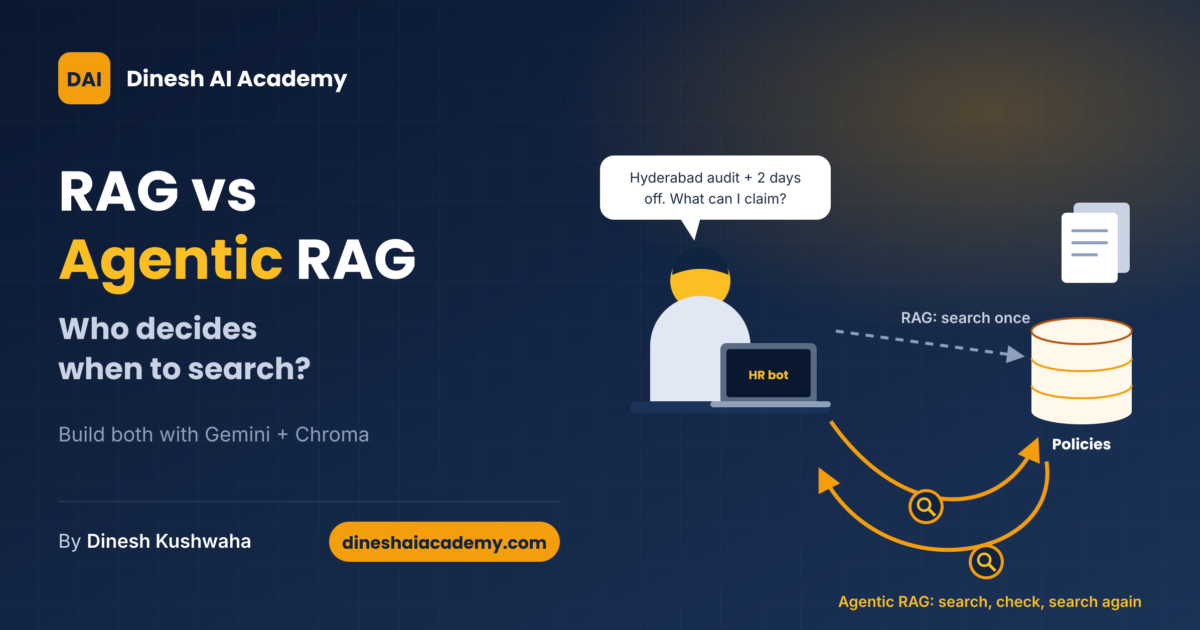
An employee types into your company’s HR assistant: “I have a 3-day audit in Hyderabad and want to stay 2 extra days for personal reasons. What can I claim, and what leave should I apply for?”
A classic RAG bot turns that whole sentence into one vector, pulls the four closest chunks, and answers. If those four chunks cover the travel allowance but miss the leave rule, the bot answers half the question with full confidence. It cannot notice the gap, because it never gets a second search.
Our practical guide to RAG explained how basic RAG works and when to consider the agentic version. This guide picks up there and builds both systems on one stack: Gemini for answers, Gemini Embedding 2 for vectors, and Chroma as the vector database. You will see the exact line where RAG becomes Agentic RAG, with every piece of code tested and shown.
The one-line difference
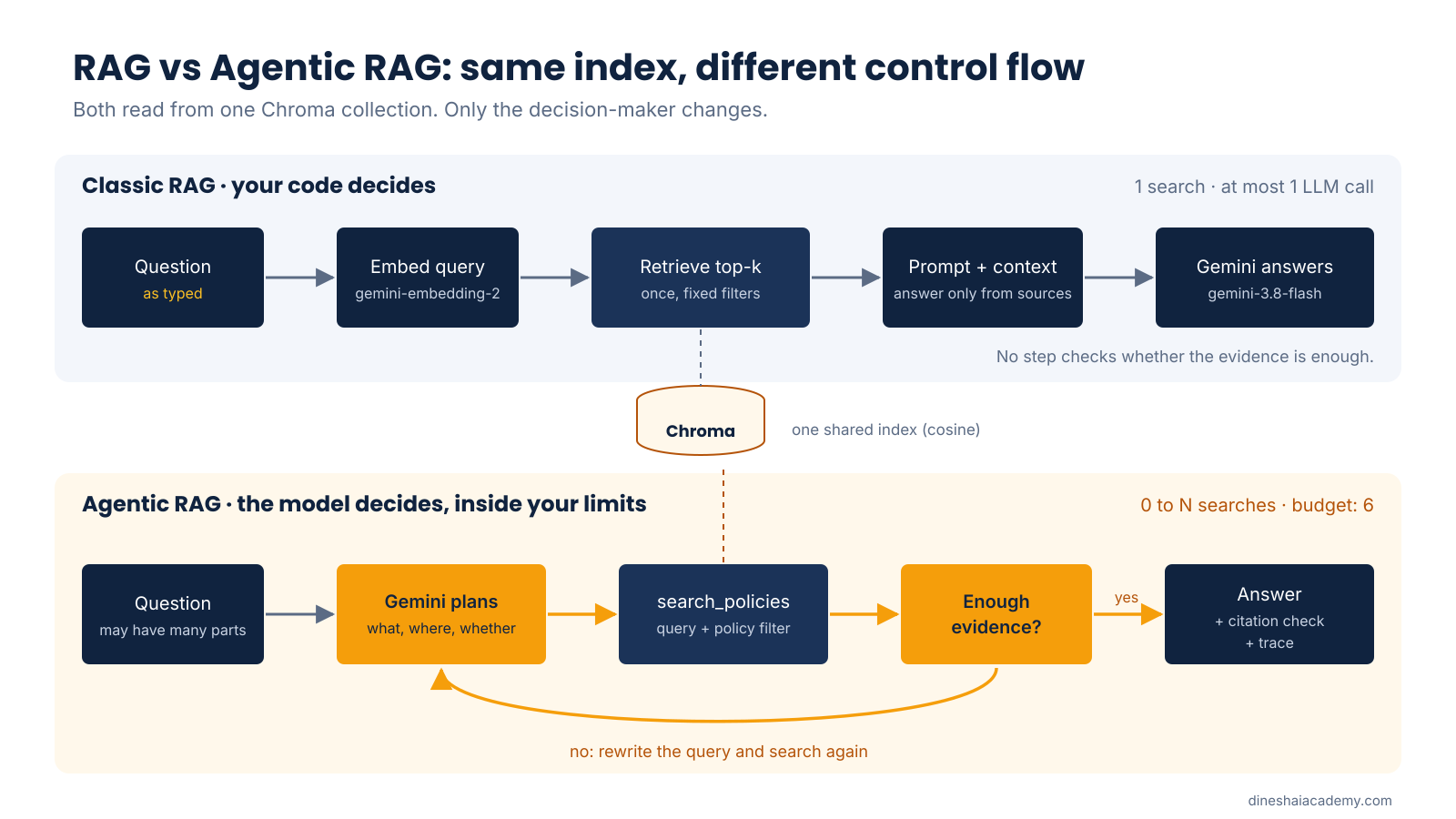
Classic RAG retrieves once, on a path your code decides. Agentic RAG lets the model decide, in a loop, what to retrieve and when to stop.
Think of classic RAG as a librarian who hands you the four books closest to your question. Agentic RAG is a researcher who reads those books, notices a missing fact, walks back to a specific shelf, and only then writes the answer.
The analogy breaks in one place. A human researcher has judgement. The model’s “judgement” is a prediction, so in Agentic RAG your code still sets the limits: how many searches, which tools, and what counts as a source.
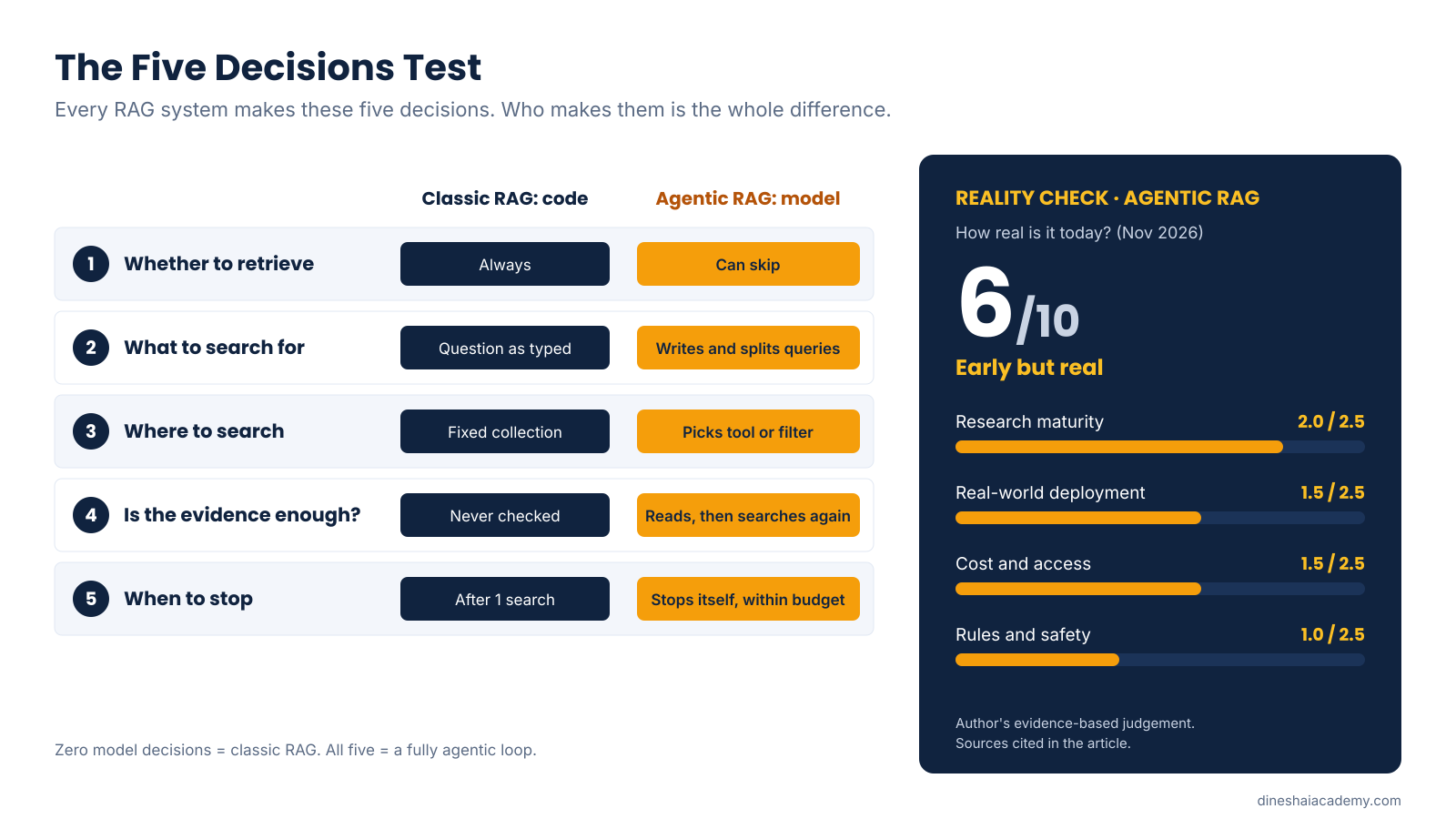
RAG vs Agentic RAG: the Five Decisions Test
Most comparisons stop at “agentic is smarter”. That is not precise enough to build with. Every RAG system makes five decisions for each question. The difference between the two designs is who makes each decision.
| Decision | Classic RAG (your code decides) | Agentic RAG (the model decides) |
|---|---|---|
| 1. Whether to retrieve | Always. Search runs on every question. | The model can skip search, for example for “thanks” or a follow-up it can already answer. |
| 2. What to search for | The user’s question, exactly as typed. | The model writes its own queries, splits one question into several, and rewrites weak ones. |
| 3. Where to search | One collection with fixed filters. | The model picks the tool or filter, such as “travel policy only”. |
| 4. Is the evidence enough? | Never checked. Top results go straight into the prompt. | The model reads the results and searches again if a fact is missing. |
| 5. When to stop | After one search and one answer. | When the model stops calling tools, or your budget runs out. |
Count how many decisions the model makes. Zero means classic RAG. All five means a fully agentic loop. Many real systems sit in between: letting the model rewrite the query (decision 2) is a small, cheap first step. This gives your team a precise vocabulary. “We added agentic RAG” is vague. “We let the model choose the policy filter and retry once” is a design decision you can test.
What does not change
The documents, the chunking, the embedding model, the Chroma index and the rule “answer only from sources” are identical in both designs. Agentic RAG is not a new database or a new model. It is a change in control flow. The 2025 survey by Singh and colleagues describes it the same way: autonomous agents are placed inside the RAG pipeline to manage retrieval, using patterns such as reflection, planning and tool use [1].
The stack we will use (as of November 2026)
| Role | Choice | Why |
|---|---|---|
| LLM | gemini-3.8-flash | Stable model. Google describes it as its most intelligent Flash model, built for agents and enterprise workflows [2]. |
| Embeddings | gemini-embedding-2 | Stable. Accepts up to 8,192 input tokens and outputs 128 to 3,072 dimensions; 768, 1,536 and 3,072 are recommended [3]. |
| Vector database | Chroma (chromadb 1.5.9) | Open source and runs locally after one install. Version 1.5.9 was released on 5 May 2026 [4]. |
| SDK | google-genai (tested on 3.0.0), Interactions API | Google recommends the Interactions API for new development; generateContent remains fully supported [5]. |
One note on model choice. Google now limits the Gemini 2.5 models to users who already used them and recommends 3.5 Flash-Lite or 3.8 Flash for new projects [2]. Many older tutorials still use 2.5 model names, so check the model list before you copy any code.
Prefer less code? The Gemini API also offers a managed File Search tool that stores and retrieves your documents for you [3]. Build the pipeline yourself at least once anyway. You will understand what the managed tool does, and you will know when you have outgrown it.
Set up in two minutes
pip install chromadb google-genai
export GEMINI_API_KEY="your-key"     # Windows PowerShell: $env:GEMINI_API_KEY="your-key"
Create the key in Google AI Studio. Keep it in an environment variable or a secret manager, never in source code. Our sample knowledge base is three short, fictional policies for a mid-size Indian company: leave, travel and expense, and IT security. They are small enough to read in a minute and realistic enough to show where the two designs differ.
Part 1: Build classic RAG, step by step
Step 1: Configure the models
import os
import re
from pathlib import Path

import chromadb
from google import genai
from google.genai import types

LLM_MODEL = "gemini-3.8-flash"          # stable Gemini model (Nov 2026)
EMBED_MODEL = "gemini-embedding-2"      # stable Gemini embedding model
EMBED_DIM = 768                         # recommended sizes: 768, 1536, 3072
DATA_DIR = Path(__file__).parent / "data"
DB_DIR = Path(__file__).parent / "chroma_db"

# Reads GEMINI_API_KEY from the environment. Never hard-code keys.
client = genai.Client()
Pin exact model names. A stable model name usually does not change behaviour under you; a “latest” alias can [2].
Step 2: Chunk the documents
def chunk_markdown(path: Path) -> list[dict]:
    """Split a policy file on '## ' headings. One section = one chunk.

    Section-based chunking keeps each rule whole. For long sections, split
    further (around 300-500 words) with a small overlap.
    """
    raw = path.read_text(encoding="utf-8")
    doc_title = raw.splitlines()[0].lstrip("# ").strip()
    policy = path.stem.replace("_policy", "")            # leave | travel | it_security
    chunks = []
    for block in re.split(r"\n(?=## )", raw)[1:]:
        heading, _, body = block.partition("\n")
        section = heading.lstrip("# ").strip()
        chunks.append({
            "id": f"{policy}::{section.lower().replace(' ', '-')}",
            "title": f"{doc_title} > {section}",
            "text": body.strip(),
            "metadata": {"policy": policy, "section": section, "source": path.name},
        })
    return chunks
Each ## section becomes one chunk, so a rule is never cut in half. Every chunk gets a readable ID such as travel::hotel-limits and a policy label. The ID makes citations checkable. The label lets us filter searches later, which is exactly what the agent will use.
Step 3: Turn chunks into vectors
# ---------- 1. Embeddings ----------
# gemini-embedding-2 does not accept task_type. Put the task in the text.
def _doc_text(title: str, text: str) -> str:
    return f"title: {title} | text: {text}"


def _query_text(question: str) -> str:
    return f"task: question answering | query: {question}"


def embed_documents(titles: list[str], texts: list[str], batch: int = 50) -> list[list[float]]:
    """One vector per chunk.

    Gotcha: passing a plain list of strings to gemini-embedding-2 returns ONE
    aggregated vector. Wrap each chunk in its own Content to get one vector each.
    """
    vectors: list[list[float]] = []
    for i in range(0, len(texts), batch):
        contents = [
            types.Content(parts=[types.Part.from_text(text=_doc_text(t, x))])
            for t, x in zip(titles[i:i + batch], texts[i:i + batch])
        ]
        result = client.models.embed_content(
            model=EMBED_MODEL,
            contents=contents,
            config=types.EmbedContentConfig(output_dimensionality=EMBED_DIM),
        )
        vectors.extend(e.values for e in result.embeddings)
    if len(vectors) != len(texts):
        raise RuntimeError(f"Expected {len(texts)} vectors, got {len(vectors)}")
    return vectors


def embed_query(question: str) -> list[float]:
    result = client.models.embed_content(
        model=EMBED_MODEL,
        contents=_query_text(question),
        config=types.EmbedContentConfig(output_dimensionality=EMBED_DIM),
    )
    return result.embeddings[0].values
Three Gemini Embedding 2 details that break RAG silently.
- No
task_type. Unlikegemini-embedding-001, the new model rejects thetask_typesetting. You put the task in the text instead:task: question answering | query: …for questions andtitle: … | text: …for documents [3]. - A list of strings gives one vector, not many. Gemini Embedding 2 merges several inputs in one request into a single aggregated embedding. To get one vector per chunk, wrap each chunk in its own
Contentobject [3]. Our function also checks that the vector count matches the chunk count, so this mistake fails loudly instead of quietly ruining search. - Old and new vectors do not mix. Embeddings from
gemini-embedding-001andgemini-embedding-2live in incompatible spaces. If you switch models, re-embed every document [3]. A bonus: Embedding 2 normalises smaller sizes such as 768 automatically, so cosine similarity works out of the box.
Step 4: Store the vectors in Chroma
def get_collection():
    db = chromadb.PersistentClient(path=str(DB_DIR))
    return db.get_or_create_collection(
        name="company_policies",
        configuration={"hnsw": {"space": "cosine"}},  # default is l2; cosine suits text
        embedding_function=None,                       # we supply our own vectors
    )


def ingest() -> int:
    """Chunk -> embed -> upsert. Safe to re-run: upsert overwrites by ID."""
    chunks = [c for f in sorted(DATA_DIR.glob("*.md")) for c in chunk_markdown(f)]
    vectors = embed_documents([c["title"] for c in chunks], [c["text"] for c in chunks])
    get_collection().upsert(
        ids=[c["id"] for c in chunks],
        embeddings=vectors,
        documents=[f'{c["title"]}\n{c["text"]}' for c in chunks],
        metadatas=[c["metadata"] for c in chunks],
    )
    return len(chunks)
Two settings matter here. First, Chroma’s default distance is l2; we switch to cosine, which compares direction rather than length and suits text [6]. Second, we pass embedding_function=None because we create vectors ourselves. Chroma does ship a Gemini embedding helper, but its default model is gemini-embedding-001 [7], and doing it ourselves keeps the task prefixes under our control. upsert overwrites by ID, so re-running the indexer never creates duplicates.
Step 5: Retrieve the closest chunks
def search(query: str, k: int = 4, policy: str | None = None) -> list[dict]:
    """Semantic search with an optional metadata filter."""
    res = get_collection().query(
        query_embeddings=[embed_query(query)],
        n_results=k,
        where={"policy": policy} if policy else None,
        include=["documents", "metadatas", "distances"],
    )
    return [
        {"id": i, "text": d, "policy": m["policy"], "distance": round(dist, 3)}
        for i, d, m, dist in zip(res["ids"][0], res["documents"][0],
                                 res["metadatas"][0], res["distances"][0])
    ]
With cosine space, Chroma reports distance as 1 minus cosine similarity [6]. Lower means closer. The optional policy filter is not used by classic RAG, but the agent will rely on it.
Step 6: Generate a grounded answer
from common import LLM_MODEL, client, search

MAX_DISTANCE = 0.55   # cosine distance cut-off. Tune it on your own eval set.

SYSTEM = (
    "You answer employee questions using ONLY the context provided. "
    "Cite the chunk id in square brackets after each fact, e.g. [travel::hotel-limits]. "
    "If the context does not contain the answer, say exactly: "
    "\"I could not find this in the company policies.\""
)


def answer(question: str, k: int = 4) -> dict:
    hits = search(question, k=k)                                    # 1. retrieve (once)
    hits = [h for h in hits if h["distance"] <= MAX_DISTANCE]       # 2. drop weak matches
    if not hits:
        return {"answer": "I could not find this in the company policies.", "sources": []}

    context = "\n\n".join(f"[{h['id']}]\n{h['text']}" for h in hits)  # 3. augment
    interaction = client.interactions.create(                         # 4. generate
        model=LLM_MODEL,
        system_instruction=SYSTEM,
        input=f"Context:\n{context}\n\nQuestion: {question}",
        generation_config={"temperature": 0.2},
    )
    return {"answer": interaction.output_text, "sources": [h["id"] for h in hits]}
Read the four numbered comments and you have the whole of classic RAG: retrieve, filter, augment, generate. Three safety rails keep it honest. The distance cut-off throws away weak matches. The system instruction forbids answers from outside the context. Citations let a human check every fact. The value 0.55 is a starting point, not a standard. Tune it on 20 to 50 real questions from your users.
python common.py          # index the three policies once
python rag_classic.py "How many days of earned leave do I get per year?"
Where classic RAG stops
Look at the Five Decisions Test again. This pipeline makes decisions 3, 4 and 5 by hard-coding them. For the Hyderabad question, it searches once with a blended query. The top four chunks may contain the allowance, the personal-days rule and the leave rule. They may not. If one is missing, nothing in the pipeline notices, and the answer still sounds complete.
Part 2: Build Agentic RAG on the same index
We reuse common.py unchanged. Only the control flow changes.
Step 1: Turn search into a tool
SEARCH_TOOL = {
    "type": "function",
    "name": "search_policies",
    "description": "Semantic search over company policy documents. "
                   "Returns the most relevant chunks with their ids.",
    "parameters": {
        "type": "object",
        "properties": {
            "query": {"type": "string", "description": "A focused search query for ONE fact."},
            "policy": {"type": "string", "enum": ["leave", "travel", "it_security"],
                       "description": "Optional. Restrict search to one policy."},
            "k": {"type": "integer", "description": "Number of chunks, 1-5. Default 3."},
        },
        "required": ["query"],
    },
}


def run_tool(name: str, args: dict, seen: dict) -> str:
    if name != "search_policies":
        return json.dumps({"error": f"unknown tool {name}"})
    k = max(1, min(int(args.get("k", 3)), 5))                  # clamp model input
    hits = search(args["query"], k=k, policy=args.get("policy"))
    for h in hits:
        seen[h["id"]] = h
    return json.dumps(hits, ensure_ascii=False)
The tool description is how Gemini learns what the function does; the model never runs it. Your code receives the function name and arguments, runs it, and sends the result back [8]. Two details make it safe. The enum limits policy to three real values. run_tool clamps k, so a model that asks for 50 chunks gets 5. The tool is also read-only. It can search, but it cannot change anything.
Step 2: Give the agent its working rules
MAX_TOOL_CALLS = 6          # hard budget: cost, latency and runaway-loop guard

SYSTEM = """You are a company-policy assistant with a search tool.
Work like this:
1. Break the question into the separate facts you need.
2. Call search_policies once per fact. Use the `policy` filter when you know
   which policy holds the fact (leave, travel, it_security).
3. Read the results. If a fact is still missing, search again with a
   rewritten query. Do not repeat an identical search.
4. Answer ONLY from search results. Cite chunk ids in square brackets.
5. If the policies do not cover part of the question, say so plainly
   for that part. Never guess numbers."""
This prompt is the agent’s job description. Rules 1 to 3 hand decisions 2, 3 and 4 to the model. Rules 4 and 5 keep the same grounding discipline as classic RAG. Notice “Never guess numbers”: in a policy bot, a wrong rupee figure costs more than a missing one.
Step 3: Write the loop
def answer(question: str, verbose: bool = True) -> dict:
    seen: dict = {}            # every chunk the agent has read
    trace: list = []           # what the agent did, for logs and evaluation
    handled: set = set()       # function-call ids already executed
    calls = 0

    interaction = client.interactions.create(
        model=LLM_MODEL, system_instruction=SYSTEM, input=question,
        tools=[SEARCH_TOOL], generation_config={"temperature": 0.2},
    )

    while True:
        pending = [s for s in interaction.steps
                   if s.type == "function_call" and s.id not in handled]
        if not pending:
            break                                             # model chose to stop

        if calls + len(pending) > MAX_TOOL_CALLS:             # budget exhausted
            interaction = client.interactions.create(
                model=LLM_MODEL, system_instruction=SYSTEM,
                previous_interaction_id=interaction.id,
                input="Search budget used up. Answer now from the results you have, "
                      "and say clearly what you could not find.",
                tools=[SEARCH_TOOL], generation_config={"tool_choice": "none"},
            )
            break

        results = []
        for step in pending:                                  # may be parallel calls
            handled.add(step.id)
            calls += 1
            trace.append({"tool": step.name, "args": step.arguments})
            if verbose:
                print(f"  -> {step.name}({step.arguments})")
            results.append({
                "type": "function_result", "name": step.name, "call_id": step.id,
                "result": [{"type": "text", "text": run_tool(step.name, step.arguments, seen)}],
            })

        interaction = client.interactions.create(
            model=LLM_MODEL, system_instruction=SYSTEM,
            previous_interaction_id=interaction.id,
            input=results, tools=[SEARCH_TOOL],
        )

    text = interaction.output_text or ""
    cited = set(re.findall(r"\[([a-z_]+::[a-z0-9\-]+)\]", text))
    return {
        "answer": text,
        "tool_calls": trace,
        "sources": sorted(cited),
        "unverified_citations": sorted(cited - seen.keys()),   # cited but never retrieved
    }
Here is the loop in plain words. Gemini receives the question and the tool. It replies with one or more function_call steps, sometimes several at once. Your code runs each search and sends the results back as function_result steps with the matching call_id, linked to the earlier turn through previous_interaction_id [8]. The loop ends when Gemini answers instead of calling a tool. The handled set records every call ID already run, so no search ever runs twice.
Step 4: Add the guardrails
- A hard budget.
MAX_TOOL_CALLS = 6caps cost and stops runaway loops. When the budget is spent, the code asks for a final answer withtool_choiceset tonone, which prevents any further function calls [8]. - Clamped inputs. Never pass model-written arguments to a database without checking them.
- Citation verification. The code extracts every cited chunk ID and compares it with the chunks the agent actually retrieved. Anything in
unverified_citationsis a citation the model invented. Log it, and in strict settings block the answer. - A trace. Every tool call is recorded. When an answer is wrong, the trace shows whether the agent searched badly or reasoned badly.
Step 5: Run it
python rag_agentic.py "I have a 3-day audit in Hyderabad and want to stay 2 extra days for personal reasons. What can I claim, and what leave should I apply for?"

# The trace prints each search the agent chooses. Its shape looks like this
# (illustrative; Gemini writes its own queries, so yours will differ):
#   -> search_policies({'query': 'daily allowance Hyderabad', 'policy': 'travel'})
#   -> search_policies({'query': 'personal days added to official trip', 'policy': 'travel'})
#   -> search_policies({'query': 'leave type for personal days with travel', 'policy': 'leave'})
What a loop costs, counted in calls.
Classic RAG in this guide makes one query embedding and at most one LLM call per question. The agent makes one query embedding per search plus one LLM call per round of tool results, plus the first call. With our budget of six searches, the worst case is six embeddings and eight LLM calls. Each round also carries the earlier results forward, so token use grows with every step. That is why the budget is a business setting, not just a technical one. Check current prices on Google’s pricing page before you estimate costs.
Worked example: one HR assistant, three questions
Here is how each design is built to behave on three typical questions against our sample policies. These columns describe design intent, not benchmark results. Run your own questions before you choose.
| Question | Classic RAG | Agentic RAG |
|---|---|---|
| Simple: “How many days of earned leave do I get per year?” | One search finds the earned-leave chunk. Answer: 18 days, with a citation. Fast and cheap. | Same answer, plus at least one extra LLM call. The agent adds cost and no value here. |
| Multi-part: the Hyderabad audit with 2 personal days | One blended search. The answer is complete only if the top four chunks happen to include all the rules needed. | Separate searches for the allowance, the personal-days rule and the leave rule. Expected answer: INR 2,500 a day allowance and hotel stays up to INR 6,000 a night for the official days (Hyderabad is a metro), nothing for the 2 personal days, and the 2 days applied as earned leave, which the manager can approve. |
| Out of scope: “What GST applies to my hotel bill?” | If no chunk passes the distance cut-off, it replies that the policies do not cover this. | Searches, finds only hotel limits, and says the policies do not cover GST. Same honest outcome, at higher cost. |
The pattern is clear. The agent earns its cost only on the middle row, where the answer is spread across several chunks or documents.
Classic RAG vs Agentic RAG at a glance
| Classic RAG | Agentic RAG | |
|---|---|---|
| Control flow | Fixed pipeline | Model-driven loop with a budget |
| Searches per question | Exactly 1 | 0 to N, chosen by the model |
| LLM calls (this guide’s code) | 0 or 1 | 1 to 8 |
| Speed | Fast and predictable | Slower and variable |
| Best for | FAQ-style questions answered by one passage | Multi-part questions, several sources, follow-up searches |
| Debugging | Inspect one retrieval | Inspect a trace of decisions |
| Main failure | Missing context, answered confidently | Loops, wasted calls, invented citations |
| Security surface | Retrieved text reaches the prompt | Retrieved text can also influence tool calls |
Reality Map: where Agentic RAG stands today
| ✅ Already done | RAG was defined in 2020 [9]. Function calling, the building block of every agent loop, is a standard Gemini API feature [8]. Stable multimodal embeddings (gemini-embedding-2, last updated April 2026) are generally available [3]. |
| 🔄 In progress | Research ideas such as retrieval on demand (Self-RAG) and grading retrieved documents (CRAG) are moving into frameworks and products [10][11]. The field’s taxonomy is still being revised: the main survey’s fourth version appeared in April 2026 [1]. |
| 🔮 Possible next | Agents that search text, images, PDFs and video in one index. Gemini Embedding 2 already maps these into one space [3], and Chroma publishes an agentic video-search example built on it [7]. Wide production use is likely if evaluation tools keep pace. |
| ❌ Not possible yet, and why | An agent that never hallucinates or cannot be manipulated. OWASP states that RAG does not fully stop prompt injection and that there may be no fully reliable prevention method, because of how generative models work [12]. Guardrails reduce risk; they do not remove it. |
Milestone timeline
| Year | Milestone | Status | Source |
|---|---|---|---|
| May 2020 | “Retrieval-Augmented Generation” paper by Lewis et al. | Achieved | [9] |
| Oct 2023 | Self-RAG: the model decides when to retrieve and critiques its own output (ICLR 2024) | Achieved | [10] |
| Jan 2024 | Corrective RAG (CRAG): a retrieval evaluator triggers corrective actions | Achieved | [11] |
| Jan 2025 | First version of the Agentic RAG survey and taxonomy | Achieved | [1] |
| Jun 2025 | Latest update to gemini-embedding-001 (text only) | Achieved | [3] |
| Apr 2026 | Agentic RAG survey v4; latest update to gemini-embedding-2 (multimodal) | Achieved | [1][3] |
| May 2026 | Chroma 1.5.9 released | Achieved | [4] |
| Oct 2026 | Google recommends the Interactions API for all new Gemini development | Current guidance (as of Nov 2026) | [5] |
Reality Check: how real is Agentic RAG today?
| Factor | Score | Evidence |
|---|---|---|
| Research maturity | 2.0 / 2.5 | RAG dates to 2020 and adaptive retrieval has peer-reviewed results (Self-RAG at ICLR 2024), but the taxonomy is still being revised [9][10][1]. |
| Real-world deployment | 1.5 / 2.5 | The building blocks are standard in the Gemini API and vendors sell agentic RAG products, but independent production data is thin [8][13]. |
| Cost and access | 1.5 / 2.5 | Open-source vector databases and stable models are easy to get [4], but each loop multiplies calls: up to 8 LLM calls instead of 1 in this guide. |
| Rules and safety readiness | 1.0 / 2.5 | Known guidance exists (least privilege, human approval, separating external content), but OWASP warns prompt injection may have no fully reliable fix [12]. |
Reality Check: 6/10, early but real. Strong research and easy building blocks, held back by cost per question and unsolved security questions. Classic RAG, by contrast, is mainstream.
What the research says
- The original RAG (2020). Lewis and colleagues combined a model’s built-in knowledge with a searchable document index, and beat the best published results of the time on three open-domain question-answering benchmarks. They also showed the index could be swapped to update what the model knows [9].
- Self-RAG (2023). The model learns to decide when retrieval is needed and to critique both the passages and its own output. The authors report that their 7B and 13B models outperformed strong LLMs and retrieval-augmented models across a range of tasks [10]. This is decision 1 and decision 4 from our test, trained into the model.
- Corrective RAG (2024). A lightweight evaluator scores the retrieved documents and triggers different actions, including web search, when retrieval looks weak. It plugs into existing RAG systems [11]. Our agent’s “search again if a fact is missing” rule is a simpler, prompt-based version of the same idea.
- The Agentic RAG survey (2025, revised 2026). It groups systems into single-agent, multi-agent and graph-based designs, and covers uses in healthcare, finance and education [1]. It is a survey, so it maps the field rather than running new benchmarks.
- The industry view. Progress, which sells an agentic RAG product, frames the choice as capability versus complexity, paid for in extra LLM calls and latency [13]. That is a vendor’s view, but it matches the call counts in this guide.
Where it goes wrong (and how to fix it)
- One vector for the whole batch. Sending a plain list of chunks to Gemini Embedding 2 returns a single merged vector. Fix: wrap each chunk in a
Contentobject and assert the counts match. - Mixed embedding models. Indexing with one model and querying with another returns nonsense rankings. Fix: store the model name in the collection metadata and re-embed everything when it changes.
- Default distance metric. Chroma uses
l2unless told otherwise. Fix: setspace: cosinewhen you create the collection, before you add any data. - The agent repeats itself. Without limits, an agent can call the same search again and again. Fix: a hard budget, “do not repeat an identical search” in the prompt, and a log of call IDs.
- Invented citations. A model can cite a chunk ID it never saw. Fix: compare cited IDs with retrieved IDs, as our
unverified_citationsfield does. - Poisoned documents. A document can contain text such as “ignore your rules”. OWASP calls this indirect prompt injection [12]. Fix: read-only tools, least privilege, clear labelling of retrieved text as data, and human approval for any action that changes something.
- An agent for every question. Paying for a loop on simple FAQ questions wastes money and time. Fix: answer with classic RAG first and hand off to the agent only when the question has several parts or the first answer is not grounded.
What it means for you
- Students: Build classic RAG first, end to end, with your own notes as the documents. Then add one agentic decision at a time and watch the trace. You will learn more from the trace than from any diagram.
- Engineers: Build an evaluation set before you build an agent: 30 to 50 real questions with expected sources. Measure classic RAG on it. Add agentic steps only for the question types that fail.
- Leaders: Ask your team which of the five decisions the model makes, what the call budget is, and how citations are verified. If they cannot answer, the system is not ready for employees or customers.
- India: Many Indian enterprises keep policies, SOPs and circulars in separate documents, often across departments, which is exactly where multi-part questions appear. Gemini Embedding 2 supports over 100 languages [3], so include Hindi and Hinglish questions in your evaluation set and test them instead of assuming.
Dinesh’s Verdict
Agentic RAG is a real step forward for questions that need more than one search. It is also the easiest way to turn a cheap, predictable system into an expensive, unpredictable one. Most teams that struggle with RAG have a chunking or evaluation problem, and a loop does not fix that. Build the pipeline, log where it fails, and let the model take over only the decisions your logs prove your code cannot make.
Rule of thumb: if one search can answer it, you do not need an agent.
Frequently asked questions
Is Agentic RAG always more accurate than classic RAG?
No. On single-passage questions both reach the same answer, and the agent only adds cost and delay. The gain appears on multi-part questions whose answer is spread across several chunks or documents.
Do I need LangChain or LangGraph to build Agentic RAG?
No. This guide uses only the google-genai SDK and Chroma, so you can see every step. Frameworks help later with state management, retries, multi-agent graphs and observability.
Can I use gemini-embedding-001 instead of gemini-embedding-2?
Yes, for text-only data. Use task_type="RETRIEVAL_DOCUMENT" for chunks and "RETRIEVAL_QUERY" for questions, normalise vectors smaller than 3,072 dimensions yourself, and never mix vectors from the two models in one index [3].
How do I stop the agent from looping forever?
Set a hard limit on tool calls in your code, not in the prompt. When the limit is reached, request a final answer with tool_choice set to none so the model cannot call another tool [8].
Should I use Chroma in production?
Chroma runs locally, in client-server mode, or as a hosted cloud service, so it can go beyond prototypes. If your application already runs on PostgreSQL, compare it with a vector extension there before adding a new system. Choose on your scale, operations skills and security needs, not on a tutorial’s default.
Is Agentic RAG safe for confidential documents?
It can be, with care. Apply access control in code, for example a metadata filter for the user’s department that the model cannot override. Keep tools read-only, label retrieved text as data, and require human approval for any action. OWASP’s prompt-injection guidance is a good checklist [12].
Key takeaways
- The real difference is control: in RAG your code makes the five retrieval decisions; in Agentic RAG the model makes some or all of them.
- Both designs share the same chunks, embeddings and Chroma index, so you can start classic and add agency step by step.
- With Gemini Embedding 2, put the task in the text, wrap each chunk in its own
Content, and use cosine distance in Chroma. - Every agent needs a call budget, clamped tool inputs, citation checks and a trace before it meets real users.
Build both pipelines live, with a mentor
Reading code is one thing; debugging your own retrieval at 11 pm is another. In the 3-Day AI Builder Bootcamp you build a RAG system on your own documents, then extend it into an agent with evaluation and guardrails, with live help when it breaks. Already running RAG in production? The Advanced AI Engineering Program covers evaluation, guardrails and deployment in depth.
References
- ↩ Singh, A. et al. (2025, revised 2026). Agentic Retrieval-Augmented Generation: A Survey on Agentic RAG. arXiv:2501.09136v4. https://arxiv.org/abs/2501.09136 (Accessed 09 Nov 2026)
- ↩ Google AI for Developers (2026). Models. Gemini API documentation, last updated 28 Oct 2026. https://ai.google.dev/gemini-api/docs/models (Accessed 09 Nov 2026)
- ↩ Google AI for Developers (2026). Embeddings. Gemini API documentation, last updated 29 Oct 2026. https://ai.google.dev/gemini-api/docs/embeddings (Accessed 09 Nov 2026)
- ↩ pepy.tech (2026). chromadb download statistics and latest version. https://pepy.tech/projects/chromadb (Accessed 09 Nov 2026)
- ↩ Google AI for Developers (2026). Migrating to the Interactions API. https://ai.google.dev/gemini-api/docs/migrate-to-interactions (Accessed 09 Nov 2026)
- ↩ Chroma (2026). Configure Collections. Chroma documentation. https://docs.trychroma.com/docs/collections/configure (Accessed 09 Nov 2026)
- ↩ Chroma (2026). Google Gemini embedding functions. Chroma documentation. https://docs.trychroma.com/integrations/embedding-models/google-gemini (Accessed 09 Nov 2026)
- ↩ Google AI for Developers (2026). Function calling with the Gemini API. https://ai.google.dev/gemini-api/docs/function-calling (Accessed 09 Nov 2026)
- ↩ Lewis, P. et al. (2020). Retrieval-Augmented Generation for Knowledge-Intensive NLP Tasks. arXiv:2005.11401. https://arxiv.org/abs/2005.11401 (Accessed 09 Nov 2026)
- ↩ Asai, A. et al. (2023). Self-RAG: Learning to Retrieve, Generate, and Critique through Self-Reflection. arXiv:2310.11511; ICLR 2024. https://arxiv.org/abs/2310.11511 (Accessed 09 Nov 2026)
- ↩ Yan, S.-Q. et al. (2024). Corrective Retrieval Augmented Generation. arXiv:2401.15884. https://arxiv.org/abs/2401.15884 (Accessed 09 Nov 2026)
- ↩ OWASP Gen AI Security Project (2025). LLM01:2025 Prompt Injection. https://genai.owasp.org/llmrisk/llm01/ (Accessed 09 Nov 2026)
- ↩ Progress Software (2026). Agentic RAG vs Traditional RAG: What’s the Difference? Vendor blog, 05 Aug 2026. https://www.progress.com/blogs/agentic-rag-vs-traditional-rag (Accessed 09 Nov 2026)
Image credits: All diagrams are original illustrations by Dinesh AI Academy. Sample policies in the code are fictional. Code tested with chromadb 1.5.9 and google-genai 3.0.0.
Last updated: 9 November 2026